

Set how long run details are kept
Sooner or later someone asks. A supplier sends a data-processing agreement with a question in it: how long do you keep the order data you pull from our shop? A customer asks what happens to the details in the emails they send you. Your own policy says personal data doesn’t sit around indefinitely.
The honest answer depends on a setting, and this is that setting.
Here’s why it exists. When an automation runs, it doesn’t just do the work — it records what it did, step by step, so you can open a run afterwards and see exactly what happened. That record is what makes debugging a flow possible. It’s also, unavoidably, a copy of whatever the run read: the order it looked up, the email it processed, the customer record it fetched. Useful for a week. Rarely useful after a year. And it’s the part a data-processing agreement is asking about.
Data retention puts a clock on it.
Where to find it
Section titled “Where to find it”Go to Settings → General and scroll to the Data retention panel.
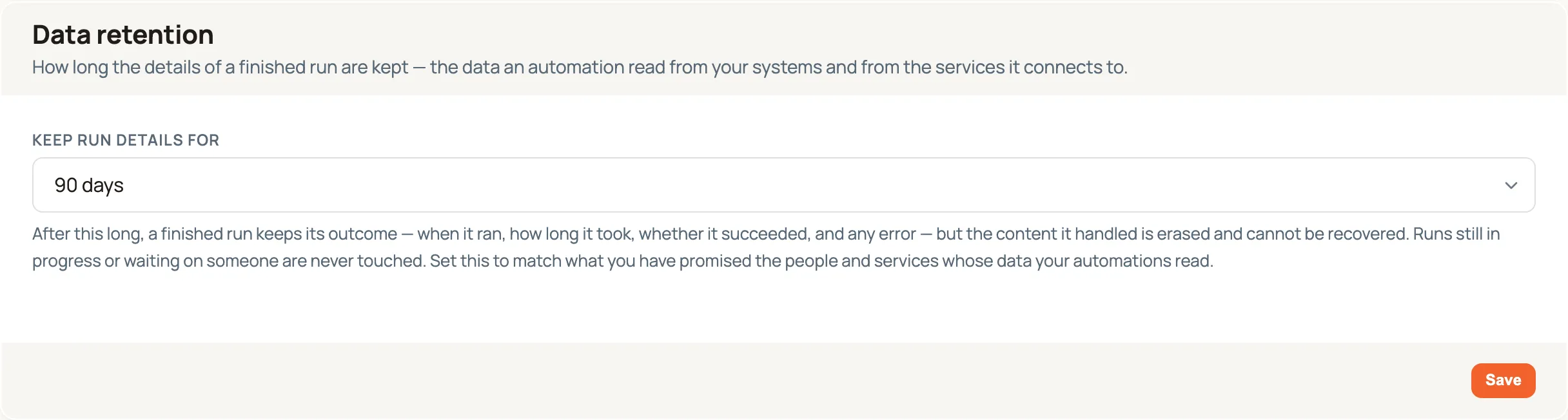
Pick a period and select Save. The options are 7, 30, 60, 90, 180, 365 or 730 days, or Keep indefinitely. New workspaces start at 90 days.
What actually happens after the period is up
Section titled “What actually happens after the period is up”Once a night, Routario looks for finished runs older than your chosen period and erases the content they handled while keeping the record that they happened.
That distinction is the whole design, and it’s worth being precise about:
| Kept forever | Erased after your period |
|---|---|
| That the run happened, and when | What it read — the order, the email, the record it fetched |
| Whether it succeeded, failed, or finished with errors | What each step produced |
| How long it took, and how long each step took | The back-and-forth between an agent and its tools |
| Which steps ran, and in what order | The values that got filled into each step’s fields |
| Which tools an agent called, by name | |
| Any error message |
So a year-old run still tells you the nightly stock sync ran on 3 March, took 4.2 seconds, called Find WooCommerce order, and succeeded. It no longer tells you which order, or what was in it.
This is deliberate. Deleting the runs outright would empty your history: the Jobs health view, run counts, failure rates, the “has this been working?” question — all of it reads that record. Keeping the outcome and dropping the contents answers the data question without blinding you to how your automations have been behaving.
Runs still in progress are never touched
Section titled “Runs still in progress are never touched”Age alone never triggers an erase. A run only becomes eligible once it has finished — completed, failed, or been stopped.
That matters more than it sounds. A run parked on an Ask a person step can wait days or weeks for someone to answer, and it needs everything it has gathered so far in order to carry on when they do. A run that was interrupted by a restart needs the same thing to pick up where it stopped. Those runs keep their details however old they are, and lose them only once they’ve reached an end.
What this setting does not cover
Section titled “What this setting does not cover”This is the most common confusion, so plainly: it covers run history, not the data your automations saved on purpose.
If a flow read an order and wrote something into a table, or filed a document into Memory, or created a contact — that result is yours, it lives in your workspace, and this setting never touches it. Only the run’s own working record is affected.
Two other things keep their own clocks:
- The Logs page keeps a separate timeline of events and changes, with its own lifetime. Shortening run retention doesn’t shorten it, and vice versa.
- Temporary items in Memory — photos from a Scout device and similar captures — already expire on their own schedule, set under Settings → Memory.
What period to pick
Section titled “What period to pick”There’s no universally right answer, but the trade-off is simple: shorter is a stronger promise, longer is a longer memory.
Work backwards from what you’ve actually committed to. If a supplier’s agreement says 90 days, set 90 days — then the answer you give them is true because the system enforces it, not because someone remembered to tidy up.
Absent an external commitment, think about how far back you’d realistically look:
| If you… | Consider |
|---|---|
| Handle personal data on someone else’s behalf and have signed an agreement about it | The period that agreement states |
| Want the tightest default that still supports investigating a problem | 30 days — long enough to catch a monthly process misbehaving |
| Run seasonal or quarterly processes you compare year-on-year | 365 days, so last season’s runs are still readable |
| Are still setting things up and want nothing to disappear yet | Keep indefinitely — and revisit before you go live |
A worked example
Section titled “A worked example”You run a shop and a Routario automation answers customer emails by looking up their orders. Your platform provider asks, in their processing agreement, how long you keep order data pulled through their API.
- You agree 90 days with them.
- In Settings → General → Data retention, you set Keep run details for to 90 days and select Save.
- That night, every finished run older than 90 days has its contents erased. Orders looked up in January stop being readable in April.
- You reply to your provider: order data pulled from their API is retained for 90 days, after which it’s erased automatically by a nightly job — and you can point at the setting.
Nothing about your shop’s own records changes. If the automation filed an order summary into a table, that summary is still there. It’s the automation’s working notes that expire.
Checking it ran
Section titled “Checking it ran”Retention runs quietly in the background — there’s no progress bar and nothing to press. To confirm it’s working, open a run older than your chosen period: instead of its inputs and outputs you’ll see a note saying the details were erased, with the run’s status, timings and any error still in place.
The erase is also recorded on the Logs page, under the System lens, as an entry noting how many runs were cleaned up and the cut-off date used. It records the counts, not what was erased — a record of a deletion shouldn’t put the deleted data back.
Where to go next
Section titled “Where to go next”- Running & debugging a flow — what a run’s details are for while you still have them.
- See what happened — the Logs page — the separate timeline of events and changes, and its own Export.
- Name and colour your workspace — the other settings that live on the same page.