

See a document's original in Memory
What Memory read from a document is plain text: good for search and for Jobs, but not how a person checks a file. When you want to see the offer the customer actually sent, with its headings, its price table and its bold print, open the Source tab. It shows the original file, laid out the way its author made it, with the read text underneath.
Open the Source tab
Section titled “Open the Source tab”- Open Memory and click a document. Its story opens beside the list.
- Click Open full page.
- Click Source, next to Overview.
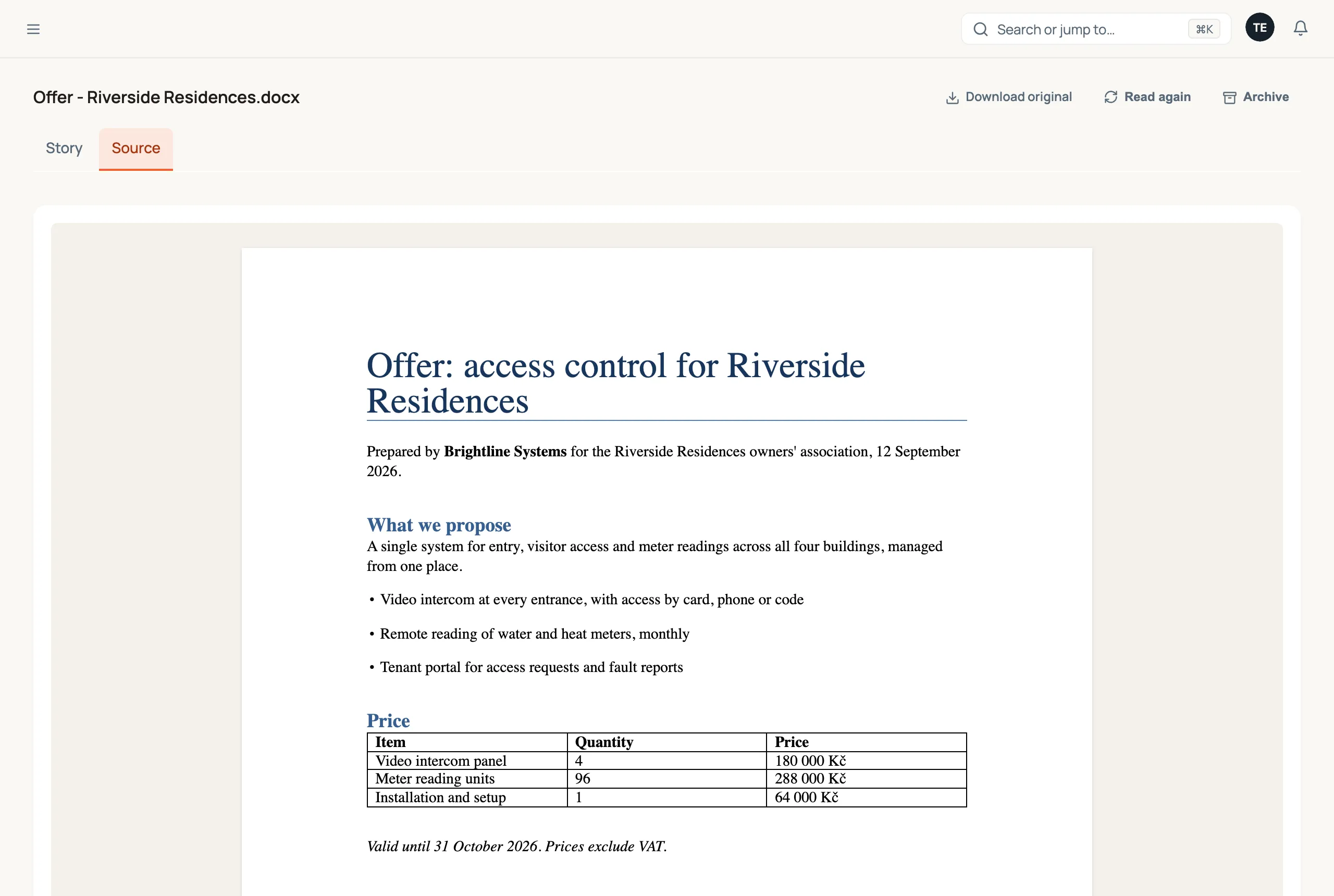
The original loads the first time you open the tab. Download original, at the top right of the page, saves the file itself.
What each kind of file looks like
Section titled “What each kind of file looks like”| File | What the Source tab shows |
|---|---|
Word (.docx) | The document laid out as pages: headings, bold and italic, lists, tables, images, headers and footers. |
Excel (.xlsx, .xlsm) | A grid like a spreadsheet, with column letters and row numbers. A workbook with several sheets gets a tab for each one above the grid. |
CSV (.csv, .tsv) | The same grid. Files separated by commas, semicolons, tabs or pipes are all recognised, as are files saved by Czech Excel (Windows-1250). |
| The PDF itself, with its own page controls. | |
| Image or scan | The picture. |
| Plain text | The text file as it is. |
Anything else, for example an older .doc or .xls, a PowerPoint file or an archive, has no preview. Use Download original to open it on your computer.
If the file is no longer stored, the page shows Original unavailable in place of the download button. What Memory read from it is still there.
The read text, underneath
Section titled “The read text, underneath”Below the original, Read text shows the text Memory took from the file (for a plain text file the preview already is that text, so it isn’t repeated): what search, Jobs and questions to Memory work from. The names, identifiers, dates and amounts Memory noticed are marked in it. Hover one to see what it is.
Comparing the two is a quick way to check a reading. If a Job pulled the wrong amount from an offer, the original shows you which table it came from.
Word documents
Section titled “Word documents”A Word file is drawn in your browser from the file itself, so it looks very close to Word. Very intricate layouts, such as floating text boxes or shapes, may sit slightly differently than they do in Word. When something looks off, Download original opens the file exactly as its author saved it.
Links in the document open in a new tab. A link that isn’t a web or email address, which a document received from outside should never need, is shown as text and can’t be clicked.
Spreadsheets and CSV files
Section titled “Spreadsheets and CSV files”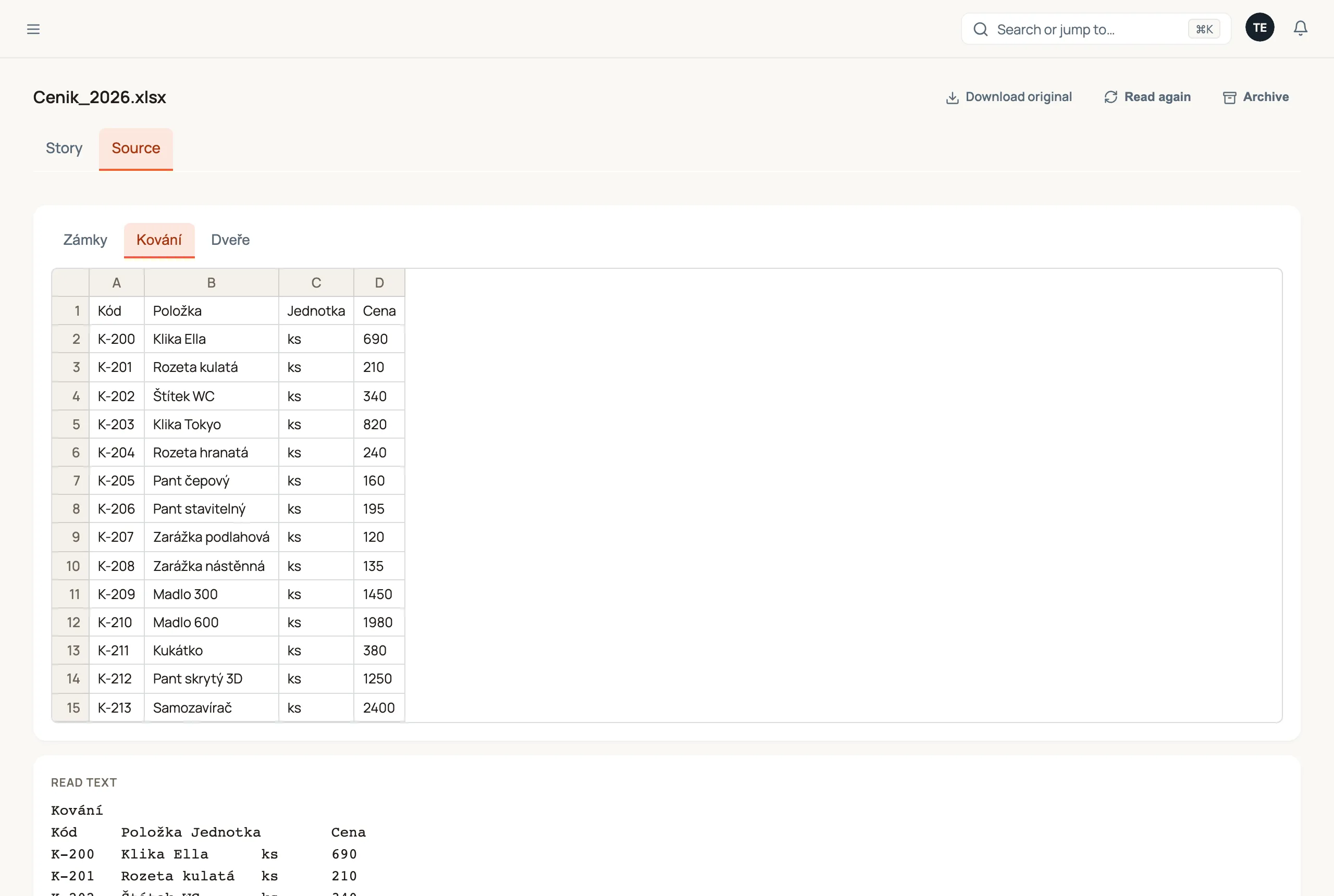
The grid shows the top-left part of each sheet, which is where the data almost always is:
- The first 500 rows and 50 columns of each sheet, and the first 20 sheets. When a sheet is bigger, a line under the grid says so: Showing the first 500 rows and 50 columns. Download the original for the rest.
- A cell with a formula shows the result Excel last saved with the file. Routario doesn’t recalculate it. A file written by a program other than Excel and never opened in Excel may not carry those results, and then the cells show empty.
- Dates show as 2026-10-01, and yes/no cells as TRUE and FALSE.
- A file over 25 MB isn’t previewed at all. The tab says so; download it instead.
A worked example: checking a supplier’s price list
Section titled “A worked example: checking a supplier’s price list”A supplier emails a price list as Cenik_2026.xlsx, with one sheet per product line. A Job reads the prices from it, but one looks wrong.
- In Memory, click the email’s attachment
Cenik_2026.xlsx, then Open full page → Source. - The grid opens on the first sheet. Click the Kování tab above it to switch to that product line.
- Row 14 shows Pant skrytý 3D at 1250. The read text below shows the same row, so the file itself carries that price: it’s a question for the supplier, not a reading error.
Where to go next
Section titled “Where to go next”- Memory: how documents come in, get read, and connect to your cards.
- Tune what Memory learns from your documents: what Memory guesses about a document, and which names it keeps.
- Attach a document to a deal or contact: keep the offer and the signed contract with the deal.