

Jobs
A Job is Routario’s picture of one real, recurring piece of work your company does — processing invoices, keeping a product catalogue up to date, following up with quiet customers. It isn’t a single automation. It’s the whole job-to-be-done, and the tools that carry it out live together inside it.
Think of a Job as a labelled folder. Inside are the pieces that do the work:
- Flows — the automations that run when something happens (an invoice arrives, a schedule fires).
- Agents — the assistants that read, decide, and draft.
- Tables — the reference data the Job reads and writes (suppliers, cost codes, a history of what it has seen).
- Scouts — a device’s eyes, ears, or voice, when the Job needs them.
- Charts and dashboards — the read-outs built on those tables, so the Job carries the numbers it produces alongside the work that produces them.
You don’t have to assemble that folder yourself. Most Jobs start from the catalog.
The catalog: ready-made Jobs
Section titled “The catalog: ready-made Jobs”The catalog is a shelf of Jobs other people have already designed — each one a description of a process, what it produces, and the tools it’s made of. You browse it the way you’d browse an app store: open a Job to read what it does, what it needs from you, and what it will hand back.
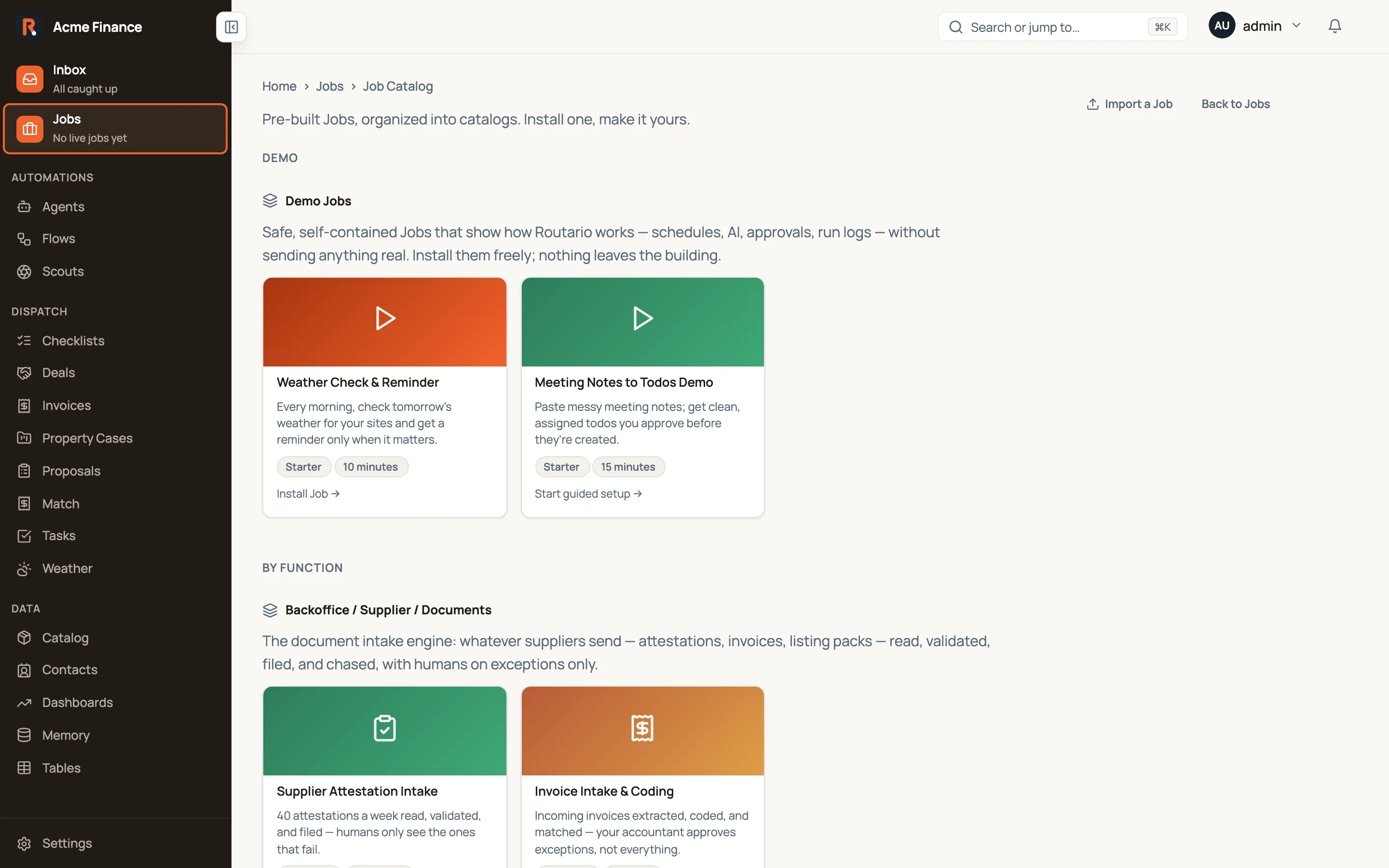
Each catalog Job carries a maturity that decides how you start it:
- Install Job — a ready, tested Job. Installing it sets up a real, private copy in your workspace.
- Start guided setup — a Job that’s ready to install but expects a bit of configuration first; installing it and walking you through that setup are the same action.
- Draft pilot plan — an early-stage idea. Instead of installing, it opens the builder so you can shape it into a real automation.
What install actually does
Section titled “What install actually does”Installing a Job from the catalog makes your own copy of it. Routario builds out its parts for you — the flows and tables it’s made of are created fresh in your workspace — and records what it was installed from, so you always know its origin.
Two things are true right after install, and they matter:
- It’s a draft. Nothing runs yet. An installed Job sits quietly until you finish setting it up and turn it on — so installing to take a look is always safe.
- It’s yours to change. The copy is independent. Editing it never touches the catalog or anyone else’s Job.
An installed Job usually needs a few details before it can do its work — which mailbox to watch, who signs off, which table holds your cost codes. That’s what guided setup is for, and it ends in one deliberate click: Activate.
From installed to working
Section titled “From installed to working”A Job moves through a simple lifecycle:
- Draft — installed but not yet running. You finish setup here.
- Active — armed. Its flows fire on their triggers and schedules.
- Paused — temporarily stopped. Future runs don’t start; work already in flight finishes.
- Archived — retired.
Only an active Job runs. A draft’s flows stay disarmed no matter what would normally trigger them, so a half-configured Job can never fire by accident — the one gate is Activate, and you reach it by finishing guided setup.
Shadow and demo: Jobs that send nothing
Section titled “Shadow and demo: Jobs that send nothing”A Job runs in one of three modes:
- Live, the ordinary state: what the Job sends goes out.
- Shadow: the Job runs on real data and real triggers, alongside the way the work is done today, and nothing it sends leaves your workspace. This is the stage a Job passes through before it goes live, so you can see what it would have done while people keep doing the work.
- Demo: the same “nothing leaves” rule, for a Job that exists to show what is possible. A demo Job is a showcase and is not meant to go live.
A shadow Job carries a Shadow chip and a demo Job a Demo chip on the Jobs board, and the board’s Mode filter lists each on its own. Their flows run exactly as a live Job’s would, on the same triggers and the same data, with one difference: every step that would send something or act on an outside system is not carried out.
- Messages: an email, a webhook, a WhatsApp, Slack, Teams or Telegram message.
- Actions in connected systems: an internal note on a Zendesk ticket, an invoice in Fakturoid or iDoklad, a file written to connected storage, a calendar event.
- Agent tool calls: the same actions taken by an agent the flow starts. That includes an action a person approves while the run waits, and one approved later from the Inbox.
- Sub-flows: a flow the Job’s flow starts with a Run flow step sends nothing either, even when that flow is not part of any Job.
- Agents on their own triggers: an agent that is a part of the Job and runs on its own schedule, an incoming email or its Run button sends nothing either, as long as every Job it is a part of is in shadow or demo. An agent that a live Job also relies on keeps running live.
Each such step still succeeds. On the run page it carries a Not sent tag,
and the banner above the canvas counts how many steps were held back. Its result
shows "mocked": true, the mode, and, under would_have, what it would have
sent. Any field named as a password, key or token is blanked out. Work that
stays inside Routario is real: tables, Memory, Contacts and bell notifications
all happen, so you see what the Job actually does.
For example, a support flow that drafts a reply and posts it as a Zendesk note
will, in shadow mode, read the real ticket and write the real draft. The note
step then shows the draft under would_have.body instead of posting it, and the
support team answers the ticket as usual.
Reviewing a shadow Job
Section titled “Reviewing a shadow Job”Shadow mode is where you find out whether the Job would have done the work right. Each finished shadow run waits for a person’s verdict, given on the run page itself:
- Agree: the Job’s output is what your team did, or would have done.
- Would change: usable after a change. Say what in the note.
- Wrong: not usable.
A Job in shadow has a Shadow review panel on its page. It shows the share of reviewed runs that agree, always with its base (“41 of 50 reviewed runs agree”), how many would change or were wrong, and how many runs are still waiting. Review next run opens the oldest run without a verdict, and saving a verdict takes you on to the next one. A run started by another run (a sub-flow, or an agent a flow step started) is judged as part of the run that started it.
Every Job has a bar to go live: at least 20 reviewed runs, with at least 90% of them agreeing, unless you set its own on the Job’s Configure page.
Switching mode
Section titled “Switching mode”On a Job’s Configure page, the Mode panel shows the current mode and buttons for the other two.
- To shadow or demo at any time, by the Job’s owner or an administrator. It only reduces what the Job does.
- To live asks you to confirm first, naming what the Job will start sending for real and how many runs its flows started in the last seven days. Going live follows the same rule as activating a Job: you need the right to activate it. If the Job has no step where a person approves and it sends things out, an administrator is asked to confirm instead.
- From shadow to live below the bar, you are asked why. The reason is kept in the Job’s history together with where the review stood. A demo Job has no review, so it has no bar.
A run already in progress keeps the mode it started in. Every switch is recorded in the Job’s history.
To put a flow you already have into a shadow Job, open the Job and use Add a flow in its Elements panel. A flow belongs to one Job at a time, so only flows that are in no Job are offered. Its next run takes the Job’s mode.
A Job also gets a mode when it arrives: the ready-made demo Jobs in the catalog
install in demo mode, and a Job you bring in with Import a Job takes the
"mode" its definition gives ("live", "shadow" or "demo").
Two more things to know:
- A later step sees only what the held-back step was given. A value the step was handed, like the ticket id, is passed through. A value the outside system would have sent back, like a Zendesk comment id or an invoice number, is not there, so don’t expect it in a step that follows.
- A held-back action is not logged as done. The run shows it as not sent; the audit trail of changes records nothing, because nothing changed.
When an element goes missing
Section titled “When an element goes missing”Open a Job and the Elements panel lists what’s in the folder. Every entry is a live link — click the agent to open the agent, the table to open the table.
Occasionally one of them says Broken reference instead of a name:

That means the Job still lists something that no longer exists. Usually someone deleted the agent, flow or table while a Job was still pointing at it. The tag stays on the row, so you can see what kind of thing has gone, and it turns red so the row can’t be mistaken for a working one.
The short code next to it is the missing item’s id, and it is shown on purpose. It is the only clue left about which thing the Job used to point at — worth keeping if you need to work out what belonged there.
Nothing repairs itself, and that’s deliberate: Routario won’t guess which agent you meant and quietly bind the Job to the wrong one, because a Job pointing at the wrong thing behaves confidently and wrongly, while one pointing at nothing tells you so. Re-linking is yours to do — pick the right element and add it back.
A broken element doesn’t stop the rest of the Job. The other elements keep working, and its runs carry on. Two things do change: the missing element itself obviously can’t run, and it stops being offered when you add a manual action button — a button pointing at something that isn’t there could never fire.
Where to go next
Section titled “Where to go next”- Set up and activate an installed Job — the step-by-step walkthrough of guided setup.
- Tell at a glance whether a Job is healthy — how to read the status pill, the coloured day bars, and the next-step button on the Jobs board.
- Add a manual action button to a Job — give a Job a one-press button for an on-demand task.
- Anatomy of a flow — how the flows inside a Job are built and run.