

Attach a document to a deal or contact
The signed quote belongs to the deal. The framework agreement belongs to the customer. You know that; the question is how to make Routario know it too, and keep knowing it.
Drop the file on the deal, and it is filed there. That link is made by you, in the moment you drop it — not worked out afterwards by reading the document. Which means it holds even when reading the document would never have produced it: a scan that came out faint, a quote that names a project code instead of the customer, a photo with no words in it at all.
Where to find it
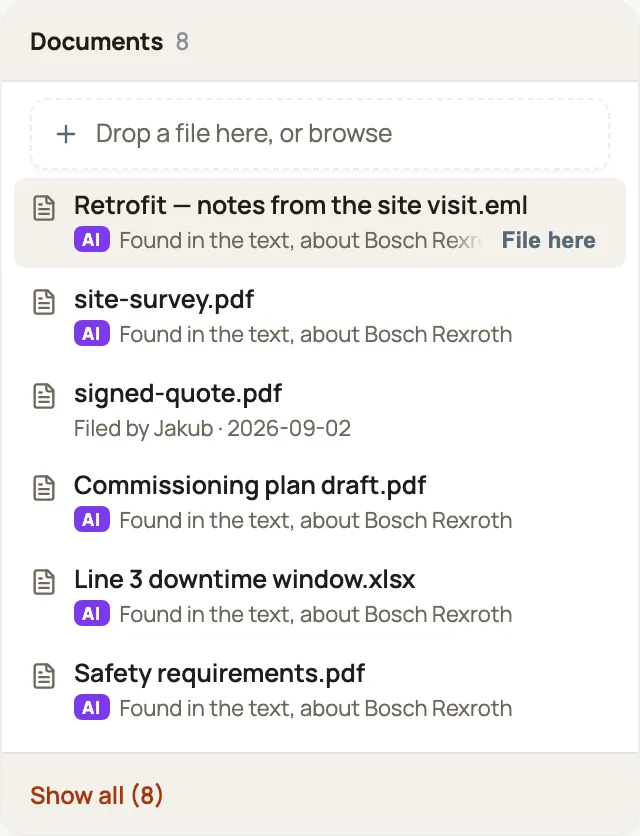
Section titled “Where to find it”Open a deal, a contact, or a company. The Documents card sits at the top of the right-hand column — everything connected to the record lives in that column, and its documents come first. On a narrower screen the column moves below the page’s details.
+ Drop a file here, or browse
Drag a file anywhere onto the card, or click the prompt and pick one. Both work; dragging is quickest when the file is already on screen.
What happens when you drop a file
Section titled “What happens when you drop a file”Two things, and it is worth knowing they are separate.
- It goes into Memory, exactly as if you had uploaded it on the Memory page. It is read and text-extracted, so it turns up in search; its type is detected; anything Routario can learn from it, it learns. Nothing about attaching cuts corners here.
- It is filed on this deal. That is the part that is new, and the part that lasts.
The file then appears at the top of the card — the list is newest first — with who filed it and when:
📄 retrofit-quote-bosch.pdf Filed by Jan Novák · 2026-09-02
Click the name to open the document in Memory — the full text, everything extracted from it, everywhere else it turns up.
Documents Routario found
Section titled “Documents Routario found”The same card also lists documents nobody filed, but that Routario found are about this record: an email you forwarded in, a PDF that names the customer. They sit in the same list, in date order, marked AI and labelled for what they are:
📄 site-survey.pdf AI Found in the text
Who a document is about decides where it shows:
- A contact shows the documents that mention that person — including emails sent to or from them.
- A company shows the documents that mention the company, and the ones about the people who work there, named: Found in the text, about Petr Svoboda. An email to someone at the customer is an email to the customer.
- A deal shows what Routario found about its company and its primary contact, and says so: Found in the text, about Bosch Rexroth. Routario recognises companies and people in what it reads, not deals — people write project names, not deal names — so a deal borrows its company’s documents rather than pretending they name the deal.
A document you filed that Routario also found appears once, as filed.
Why “filed by you” matters
Section titled “Why “filed by you” matters”A found document is genuinely useful and costs you nothing — but it is a reading of the content, so it can change. Re-read the document with a better model and the list can change. Scan a page crookedly and the mention may never be found at all.
Filing is a different kind of statement. You said this document belongs here, so it stays here:
- It survives the document being re-read, however many times.
- It survives the document saying nothing useful — a photo of a delivered pallet has no text to mention anyone.
- It survives the document naming the wrong thing, or nothing.
Keeping a document Routario found
Section titled “Keeping a document Routario found”Hover a found row and click File here. The document is now filed on this record, exactly as if you had dropped it there, and it stays whatever Routario reads next. The row changes from Found in the text to Filed by you.
It is also the most useful thing you can tell Routario about its reading: a found document someone chose to keep was found right.
Removing a document
Section titled “Removing a document”Click the ✕ on its row. The wording tells you what happens:
Document removed from this record. It stays in Memory.
You have un-filed it, not deleted it. The document, its text and everything learned from it are all still there — it simply no longer appears on this deal as filed. Routario remembers who filed it and who removed it. If Routario also found it about this deal’s company or contact, it stays on the card as a found document.
If a document is archived later
Section titled “If a document is archived later”Archiving a document in Memory does not quietly empty your deals. The row stays, marked:
📄 old-scope-draft.pdf — Archived in Memory
The fact that someone filed it is still true and still worth seeing. You just cannot open it any more. A document that was only found simply drops off the card once it is archived.
Uploading the same file twice
Section titled “Uploading the same file twice”Routario recognises a file it already holds and will not store a second copy. Filing it is a different matter: if you drop a file that is already in Memory onto a deal it was not on, it is filed on that deal. The bytes are old; the filing is new.
Attaching an email
Section titled “Attaching an email”Export the message from your mail client as an .eml file and drop it on the deal. Both the message and anything it carried are filed — so an email whose whole point is the signed quote attached to it puts that quote on the deal too, not just the covering note.
Two related formats are deliberately not filed on a deal, and Routario says so rather than quietly doing nothing:
| You drop | What happens |
|---|---|
.eml — one exported message | Filed on the deal, along with its attachments |
.vcf — a contact card | Refused: “Contact cards become contacts — upload on the Memory page” |
.mbox — a whole mailbox | Refused: “Mailboxes hold many emails — attach a single .eml instead” |
The reasoning is worth a sentence each. A contact card’s job is to become a contact, so filing the raw card on a deal would record something nobody asked for. A mailbox holds hundreds of messages and there is no sensible answer to which one belongs on this deal. Both still work perfectly well on the Memory page — that is where they do their real job.
What this does not do yet
Section titled “What this does not do yet”- You cannot yet pick just any document from Memory. You can file one the card shows as found — File here — or upload it; if the file is already in Memory, Routario recognises it and files the copy it already has.
Which files you can attach
Section titled “Which files you can attach”PDFs, images (JPEG, PNG, GIF, WebP, TIFF, BMP), Office documents (Word, Excel, PowerPoint), text, Markdown, CSV, HTML, ISDOC invoices, and audio recordings.
Where to go next
Section titled “Where to go next”- How Memory works — what happens to a document after you upload it, and why it turns up in search.
- Working with contacts — deals, contacts and companies, and what else you can put on them.
- Preview a file before saving it — checking a file is the right one before it lands.