

Merge duplicate cards — and undo it
Routario builds Memory from whatever arrives. An order confirmation names Jana Dvořáková. A delivery note two weeks later names Ing. Jana Dvořáková. You now have two cards for one person, and each holds half of what you know: one has her email address, the other has the last three documents she appears on.
Ask about her and you get whichever half matched. Merging puts the halves back together.
Because a merge is a judgement call — two similar names sometimes really are two people — every merge can be undone.
Where duplicates show up
Section titled “Where duplicates show up”Open Memory and choose Possible duplicate records.
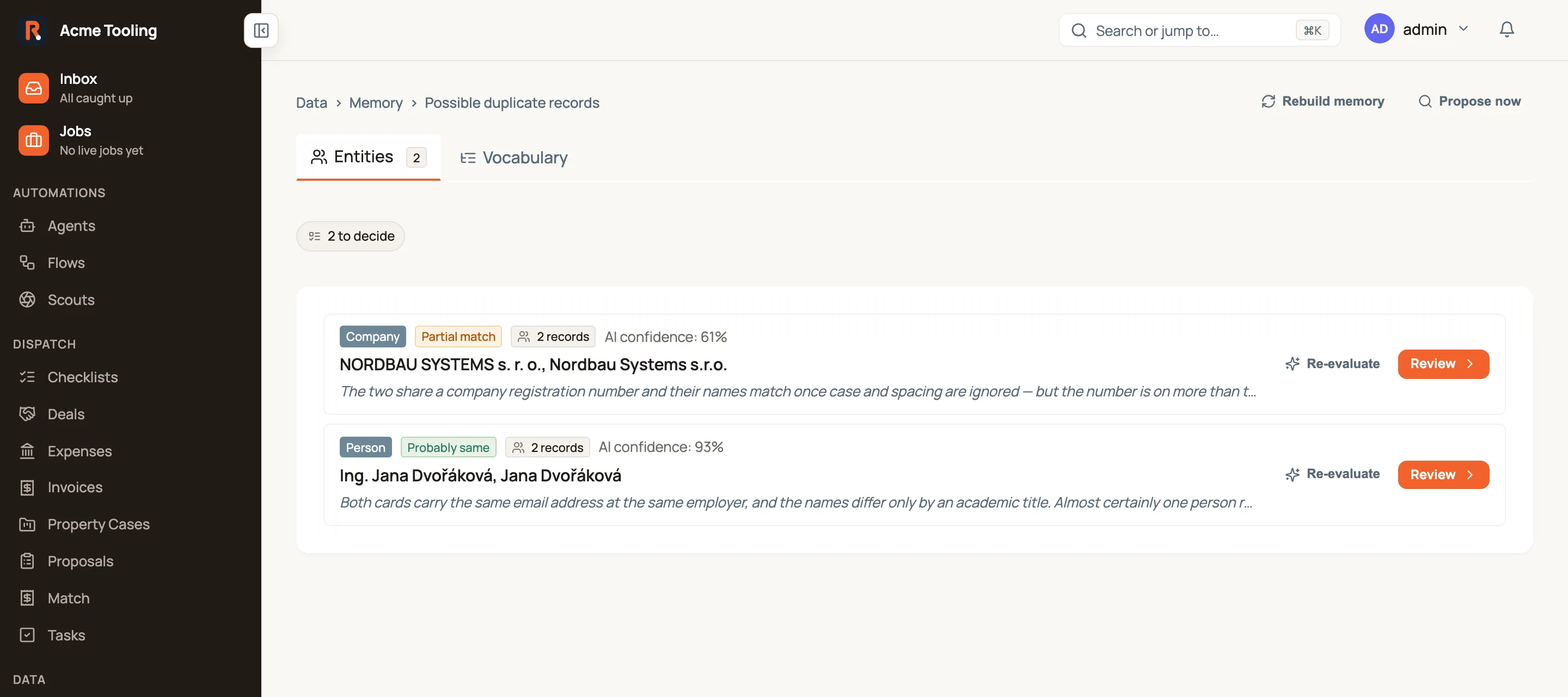
This is the queue, and it is a list to scan, not a form to fill in. Each row is one group — a set of cards Routario believes are the same thing — and tells you just enough to pick which one to open:
- the type: Person, Company, Location or Public body;
- the verdict the AI reached — Probably same, Partial match, Probably different or Unclear — next to its confidence;
- how many records are in the group;
- the first few names, and one line of the AI’s reasoning.
Press Review on a row to open that group and decide it. Long queues page 25 groups at a time, newest and strongest matches first — the chip above the list counts the whole backlog, not the page.
Three actions sit at the top of the page:
| Action | What it does |
|---|---|
| Propose now | Scans your Memory for new candidates and refills the queue. |
| Reason now | Asks the AI to judge the groups nobody has judged yet. This costs AI tokens, and groups it is confident about are merged on the spot. It only appears when something is waiting to be judged. |
| Rebuild memory | Re-reads every document you have uploaded with the current settings, then proposes groups again. Useful after you change what Memory learns. |
Re-evaluate on a row asks the AI to look at that one group again, which is worth doing after new documents have arrived.
Deciding a group
Section titled “Deciding a group”Review opens the group on its own page, with every record in it and the evidence that brought them together — a shared email address, the same employer, how many documents each one appears on.
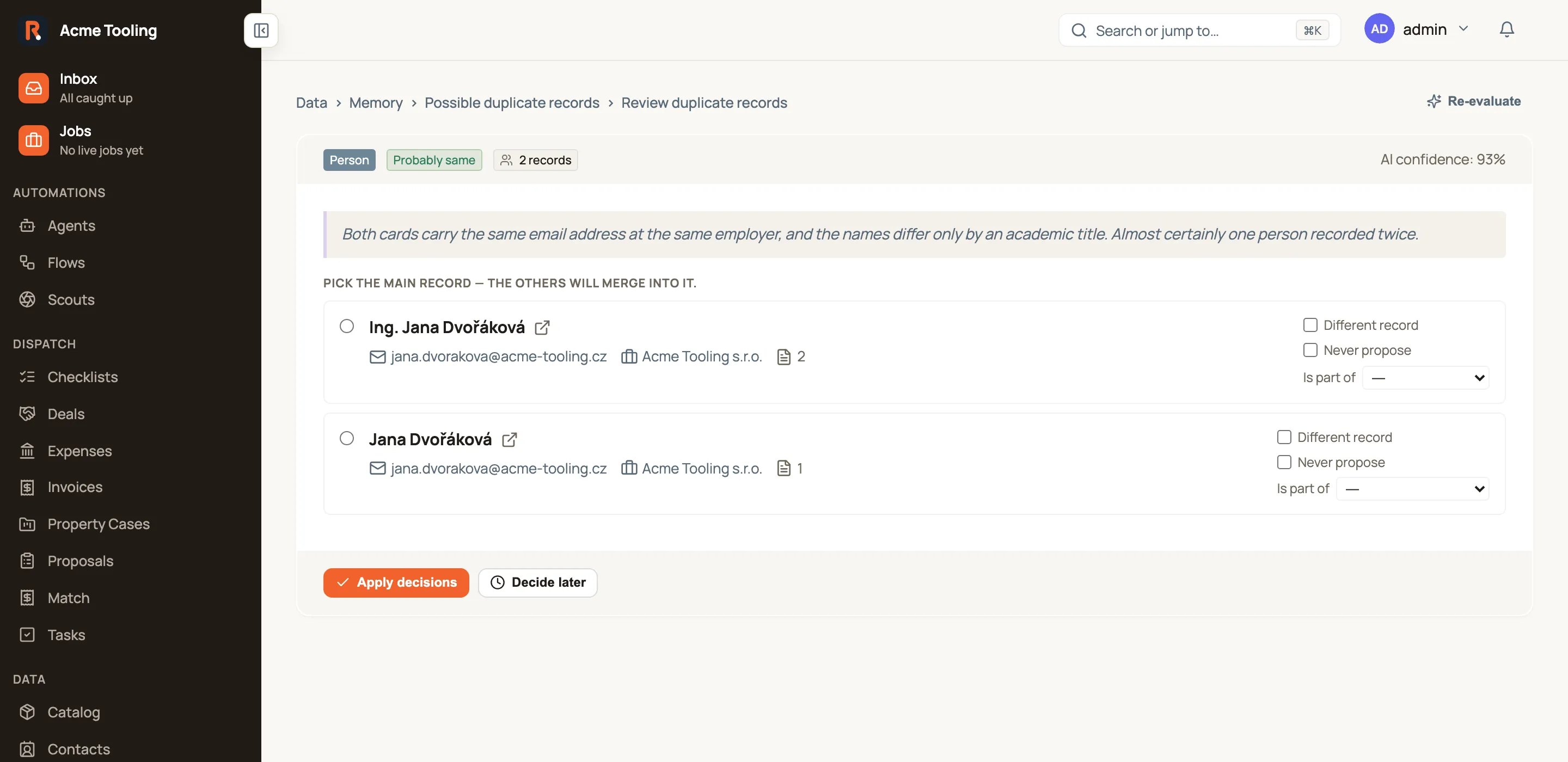
Pick the card you want to keep — the one with the fuller, more correct name — and press Apply decisions. Everything else in the group merges into it, and Routario takes you to the surviving card so you can see the result.
Three options handle the cases where “they’re the same” isn’t the answer:
| Option | Use it when | What happens |
|---|---|---|
| Different record | They genuinely are two different things | Nothing merges, and the pair stops being suggested |
| Never propose | This card keeps turning up in groups it doesn’t belong to | That card is left out of every future group |
| Is part of | One belongs inside the other — a site inside a company, a district inside a city | Both cards stay, and Routario records that one is part of the other |
Decide later parks the group without deciding anything. It comes back next time.
Everything the group contains is on that one page, on purpose: Apply decisions resolves the whole group, so a screen that showed you only some of it would merge records you never looked at.
What merging does
Section titled “What merging does”- The facts and connections of the merged-away card — emails, phone numbers, addresses, the documents it appears on, who it works for — move onto the card you keep.
- The merged-away card stops appearing in Memory, and anything that pointed at it now reads the card you kept.
- In Contacts, the other record is archived, and its deals, notes and tasks move onto the contact you keep.
Undoing a merge
Section titled “Undoing a merge”There are three ways back, and they all undo the same thing.
Straight after the merge. Landing on the surviving card, a confirmation appears with an Undo next to it. It is there for a few seconds — long enough to catch “wait, those weren’t the same person” the moment you see the merged card.
From the queue. Every resolved group stays under Recently resolved at the bottom of Possible duplicate records, with a Revert next to it.

From the card. Open the card that absorbed the other and use Revert merge.
Reverting puts the merged-away card back, with its own facts and its own connections returned to it, and drops the group back onto the pending list — Routario shows you that group again so you can see what came back. It will not merge that pair automatically a second time; it may still suggest them, but the decision comes back to you.
Undo puts the Contacts side back with it. The contact or company record the merge archived becomes active again, and the deals, notes and tasks that moved return to it — including the deal whose contact the merge cleared because that person did not work for the company you kept.
What stays put is anything that was never moved. A deal raised on the record you kept after the merge belongs there, so it stays there; so does anything you re-assigned by hand in the meantime. Undo returns what the merge took, and leaves the rest alone.
A worked example
Section titled “A worked example”Two cards for the same customer contact, one with her email and one with her paperwork:
- Open Memory → Possible duplicate records. One row is tagged Person, says 2 records, and names Ing. Jana Dvořáková, Jana Dvořáková.
- Press Review. Both rows show the same email address at the same employer — that is the evidence Routario matched on.
- Open either name in a new tab if you want to see the full card before deciding.
- Select Ing. Jana Dvořáková as the main record — it is the fuller name, and it is the one that will survive.
- Press Apply decisions. Her email, her employer and both documents now sit on one card, and Routario opens it.
- If it turns out the two were different people after all — a mother and daughter at the same firm, sharing an office address — press Undo on the confirmation, or come back later and press Revert under Recently resolved. Both cards come back with what each of them had.
Where to go next
Section titled “Where to go next”- Memory: what Routario remembers — how cards, facts and the lines between them fit together.
- Tune what Memory learns from your documents — fewer wrong cards in the first place.
- Working with contacts — the other place people and companies are merged.