

Retry a step with a loop back
Sometimes one step checks another step’s work, and the fix is simply to do it again. A checker reads a drafted reply, sees that the drafter ignored an order number it had, and wants the draft redone. You could copy the drafter and the checker and join the copies with a Merge. That is three extra steps, and the two copies drift apart the first time someone edits one of them.
A loop back does it in one wire. You draw an edge from a deciding step back to the earlier step, and it goes back at most N times. When the budget runs out, the deciding step takes its other arm, so a run always ends.
The shape
Section titled “The shape”Manual → Draft reply → Check the draft → Branch: redo? ▲ │ yes (retry ×1) └──────────────────────────────┘ │ no ▼ Post the note- Draft reply writes the reply (an AI step, for example).
- Check the draft judges it and returns a verdict.
- Branch asks
{{ check.verdict }} == "redo". Its yes arm goes back to Draft reply. Its no arm carries on to Post the note.
With the default limit of 1, the drafter runs at most twice:
| Run | What happens |
|---|---|
| The check passes first time | Draft → Check → Branch says no → Post. One draft. |
| The check fails, then passes | Draft → Check → yes, back → Draft → Check → no → Post. Two drafts. |
| The check fails twice | Draft → Check → yes, back → Draft → Check → Branch would say yes, but the loop is spent, so it takes no → Post. Two drafts, never three. |
Draw it on the canvas
Section titled “Draw it on the canvas”Drag from the Branch’s yes port up to the input of the earlier step. The canvas recognises the edge as a loop back. It draws the edge curved out to the side and dotted, labels it retry ×1, and confirms with a toast: “Goes back at most once, then takes the other arm.”
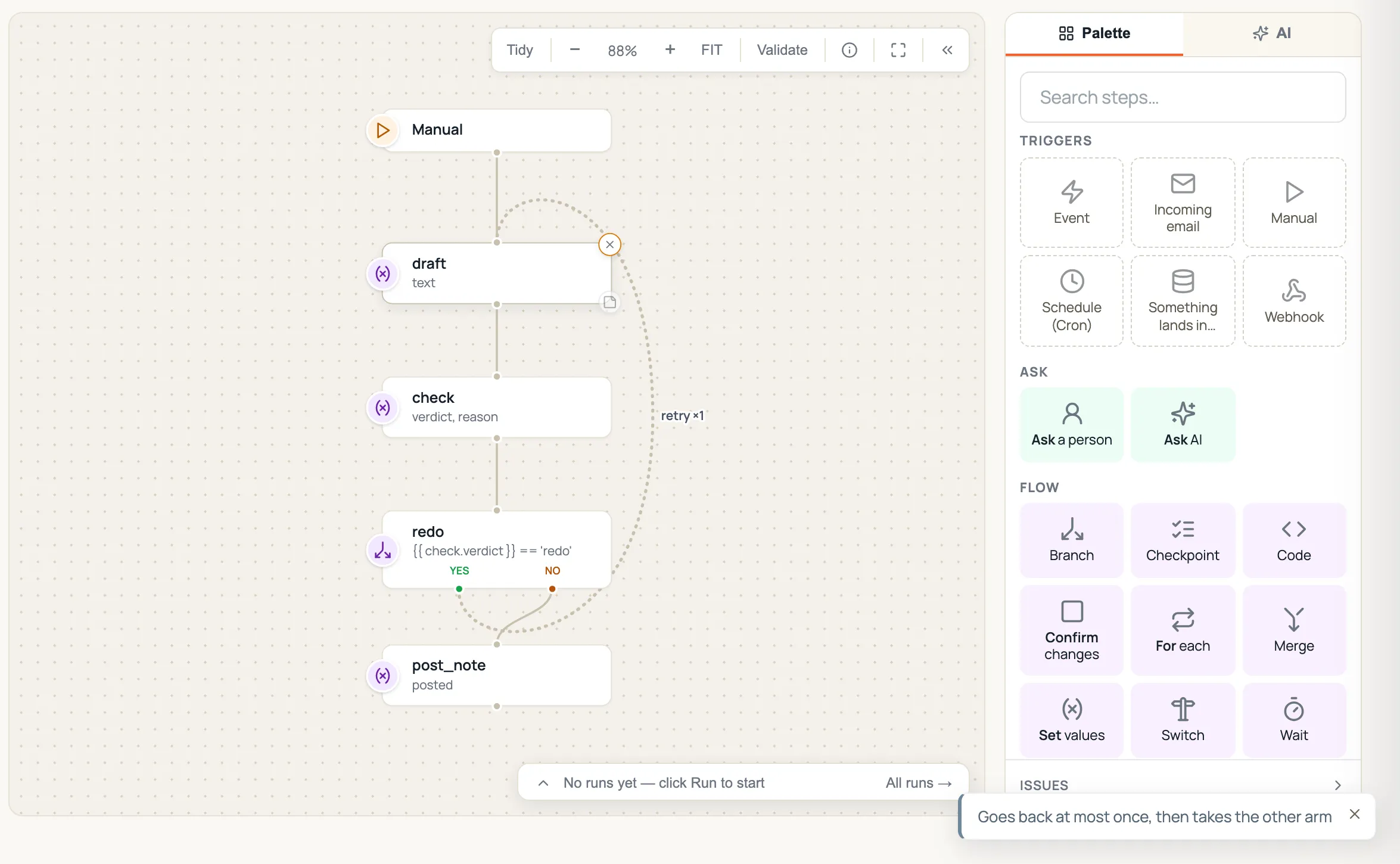
Click the retry ×N label to change the limit (1, 2 or 3). The edge is saved with the flow like any other.
Only a step that decides can go back: a Branch arm, a Switch case, or a lookup’s found / missing port. Something has to say when to try again. An edge back from any other step is refused, because it would go back every time.
What the retried step can read
Section titled “What the retried step can read”Every step that a loop back re-runs keeps each of its passes:
{{ draft.parsed }}and the step’s other fields are always the latest attempt.{{ draft.attempts }}is the list of every attempt, oldest first, the latest included.
So the drafter’s prompt can see what it tried last time and why that was rejected:
{% if draft is defined %}Your previous draft was rejected. The checker said: {{ check.reason }}Previous draft:{{ draft.parsed }}{% endif %}On the second pass, draft and check still hold the first pass’s values when the drafter starts, which is what makes this work. A retried step overwriting its own earlier attempt is the point of the loop, so the canvas does not flag it as a shadowed value.
What happens when the limit is reached
Section titled “What happens when the limit is reached”The deciding step takes its other arm:
- Branch: the opposite of the arm that goes back. If yes goes back, a spent loop takes no.
- Switch: the default arm.
- Lookup: the other port (found ↔ missing).
If that other arm is not wired, the path ends there. A Branch always has both arms wired, because the canvas will not let you save a Branch without them.
The Branch’s evaluation in the run detail says when this happened. It shows the counter and marks the arm as taken because the loop was spent, not because the condition said so.
In the run detail
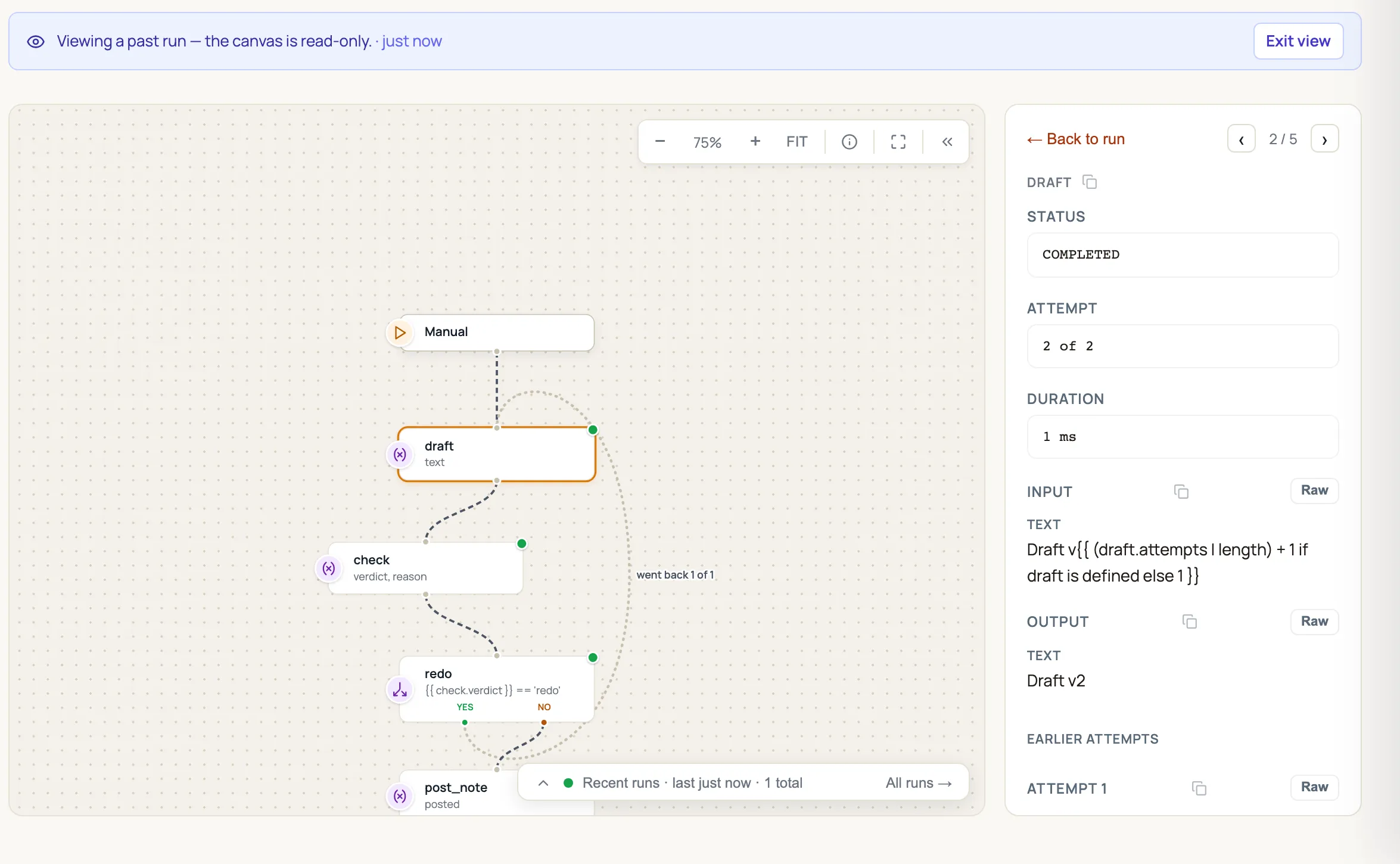
Section titled “In the run detail”Open the run on the canvas (History). A loop-back edge is labelled went back 1 of 1. The drawer for a re-run step shows:
- Attempt: for example 2 of 2.
- Input and Output of the latest attempt.
- Earlier attempts, each attempt’s output in turn.
Pauses and restarts keep the count
Section titled “Pauses and restarts keep the count”The counter lives in the run itself and is saved before every step. If the run pauses on an Ask a person step inside the loop, it carries on counting when it is answered. The same applies when Routario restarts in the middle of a run and picks the run up again: the run continues as the same attempt. It never starts a fresh budget.
When the run enters the loop’s first step the ordinary way again, the count starts afresh. This happens inside a For each loop, for example, so every item gets its own N retries.
In a flow’s JSON
Section titled “In a flow’s JSON”A loop back is an ordinary edge with max_loops:
{"from": "redo", "to": "draft", "label": "yes", "max_loops": 1}max_loops is 1 to 10, and "loop": true on its own means 1. The edge must really go back. Its target has to come before its source on every path, or the limit does nothing and the Issues panel says so. A back edge without max_loops is a loop with no limit, and the flow cannot be saved.
Where to go next
Section titled “Where to go next”- Routing a flow: Branch, Switch, Merge and For each.
- Branch on an AI decision: returning a verdict a Branch or Switch can route on.
- Running and debugging a flow: reading a run on the canvas.