

Data products: tables your agents can ask
The usual way to give an AI your business knowledge is to paste it into the prompt. It works for a week. Then every new case adds a paragraph, the same fact ends up in five places, and nobody can say which copy is current.
A data product gives that knowledge one home. It is an ordinary table that has introduced itself to your agents, the way a new colleague would at a team meeting: what I answer, who looks after me, what you can ask me, and how far to trust what I say.
The manifest
Section titled “The manifest”You turn a table into a data product on its settings page: Data → Tables → (your table) → Columns → Data product. The manifest has five parts.
| Field | What it says | Example |
|---|---|---|
| What it answers | One line, so an agent can decide whether this table fits the case | Shipping prices, currencies and weight limits by country |
| Owner | A role, never a person | Helpdesk lead |
| Example questions | Two or three, in plain words | ”Shipping to Canada: price and currency?” |
| What each column means | A short meaning per column, so an agent knows what to filter on | price — shipping price per parcel, in the row’s currency |
| Trust scheme | How a row earns trust (below) | Status: confirmed |
Plus a write policy: agents propose, the owner confirms, or only the owner.
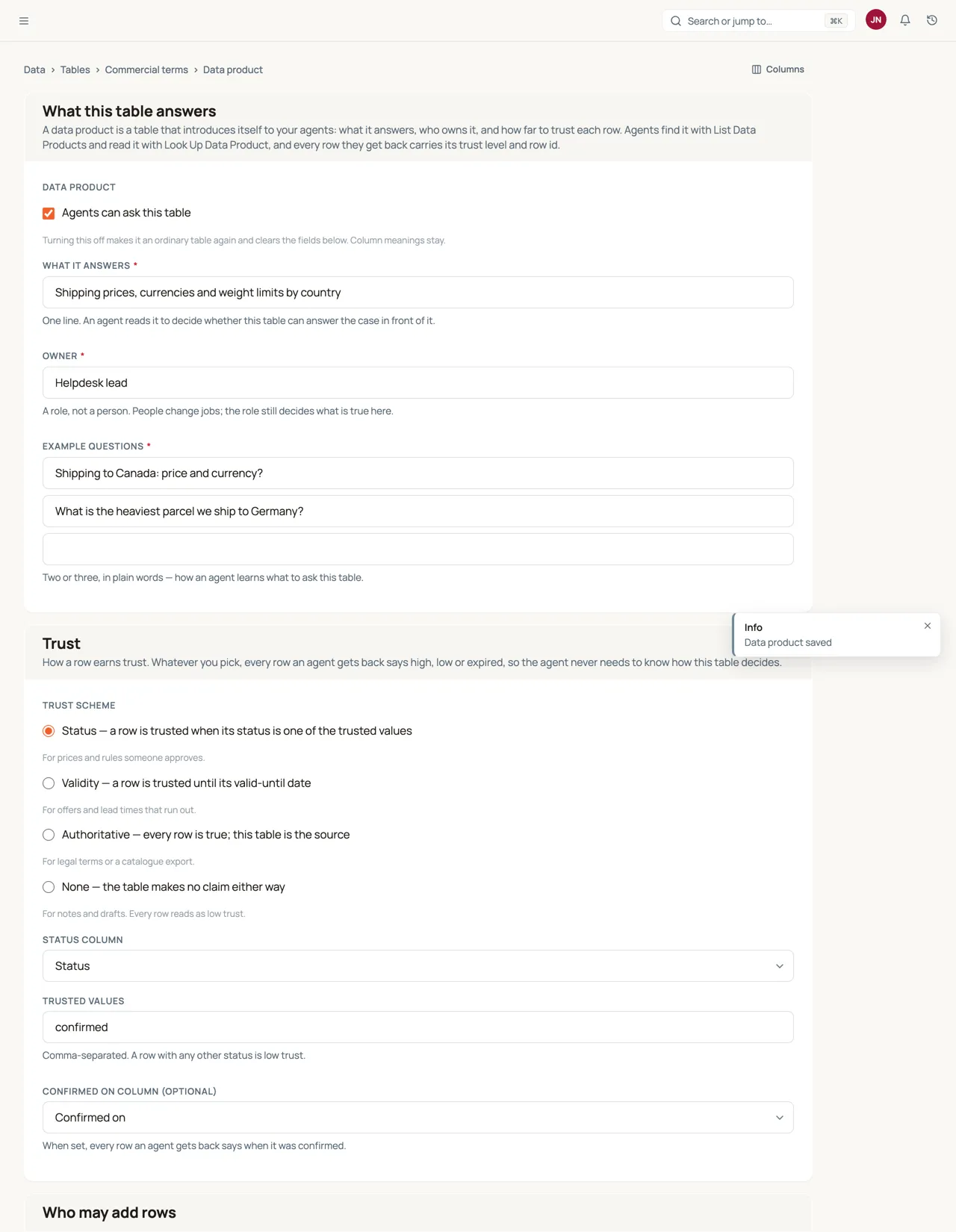
The owner is a role on purpose. People change jobs, but “the helpdesk lead” still decides what the commercial terms are — so Routario refuses an owner that is a person’s name or email address.
A column’s meaning is the column’s own description, so it has one home whether or not the table is a product. A column with no meaning reads as its label.
Trust is a choice, not a rule per table
Section titled “Trust is a choice, not a rule per table”Not every table means the same thing by “true”. A price list is true because someone approved it; a delivery estimate is true until a date; a legal text is simply true. So you pick a scheme:
| Scheme | A row is trusted when | Typical use |
|---|---|---|
| Status | Its status column holds one of the values you name as trusted, e.g. confirmed | Prices, rules |
| Validity | Today is on or before its valid until date — after that it is expired | Offers, lead times |
| Authoritative | Always: the table is the source | Legal terms, a catalogue export |
| None | Never claimed either way | Notes, drafts |
Whatever the scheme, every row an agent gets back carries the same label: trust: high, low or expired. The agent never needs to know how a given table decides; it only reads the label. A status, validity or authoritative table can also name a confirmed on column, and every row then says when it was confirmed — and a confirmed by text column, where Confirm in the table writes the person’s name.
List, ask, look up
Section titled “List, ask, look up”List Data Products returns every product’s manifest. An agent calls it first and picks the products the case needs — instead of the flow author guessing in advance which tables to read on every run.
Ask Data Product takes the question in plain words, as the customer asked it, and answers with rows of one product (see Asking in plain words below).
Look Up Data Product is the spreadsheet-world call: one product, an exact filter.
{"country": "Canada"}{"country": {"in": ["Canada", "USA"]}}{"part_name": {"contains": "brake"}}{"codes": {"has": "C1"}, "kind": {"not": "question_type"}}{"sku": {"wildcard": "BRK-*"}}A plain value means equals; null means the column is empty. not excludes a value (an empty cell counts as “not”). contains finds text anywhere in the cell; has matches one whole item of a comma-separated list, so a cell reading C1, C6, ALWAYS has C1 but C10 does not. contains, has and wildcard ignore case; in a wildcard * is any run of characters and ? exactly one. Several keys must all hold. You can also name the columns you want back and a limit (20 by default).
The answer: rows, receipts and “nothing found”
Section titled “The answer: rows, receipts and “nothing found””A data product answers with rows, never prose. Each row carries its receipt:
{ "dp": "commercial_terms", "owner": "Helpdesk lead", "trust_scheme": "status", "rows": [ {"row_id": "0199…", "trust": "high", "owner": "Helpdesk lead", "confirmed_at": "2026-10-01", "values": {"country": "Canada", "price": 26, "currency": "USD"}} ], "count": 1, "nothing_found": false}The agent writes the reply itself, so every claim in it can be traced to a row_id, and the run log records what was asked and what came back. When a reply is wrong you can tell which of three things happened: the data was wrong, the data was missing, or the agent never asked.
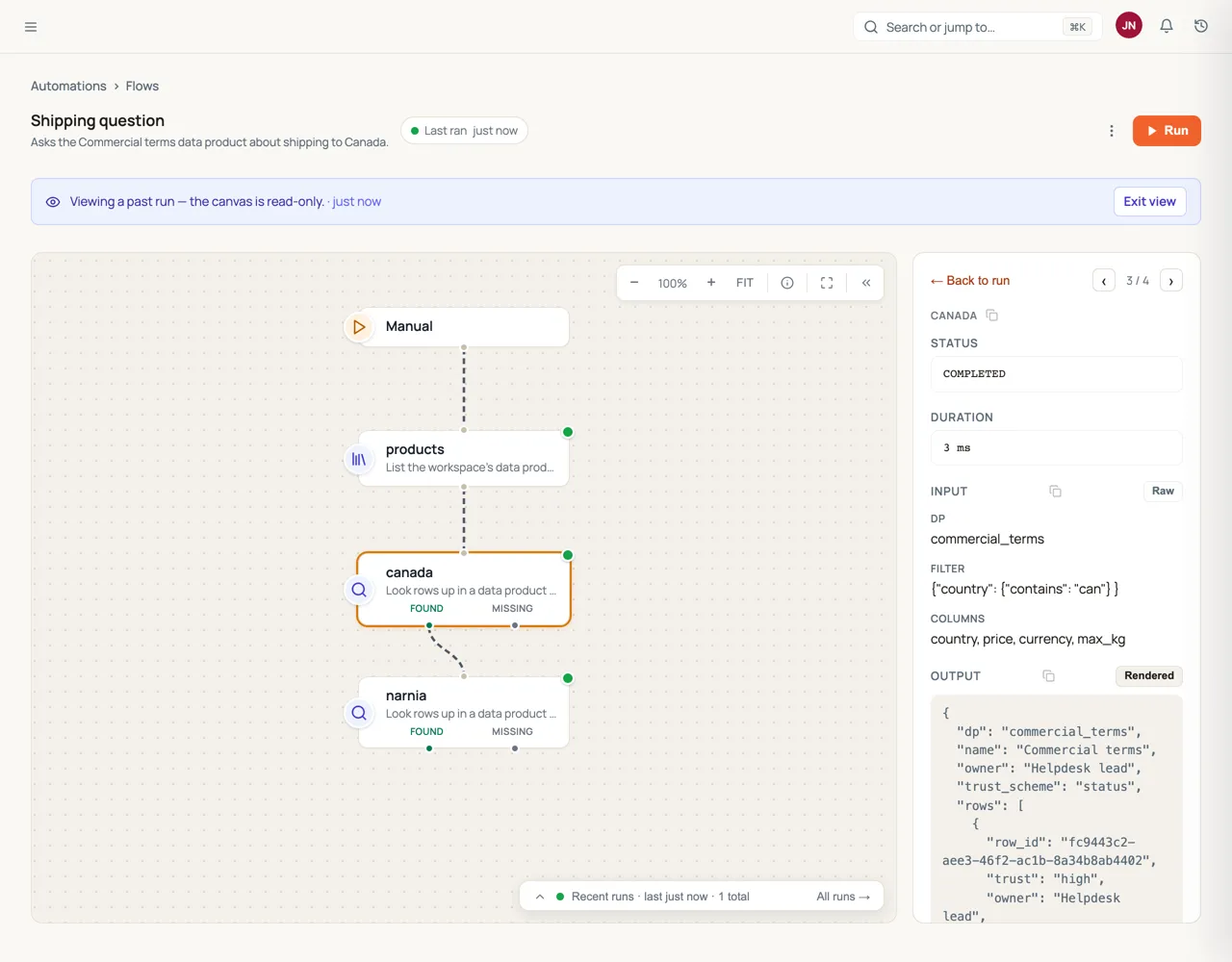
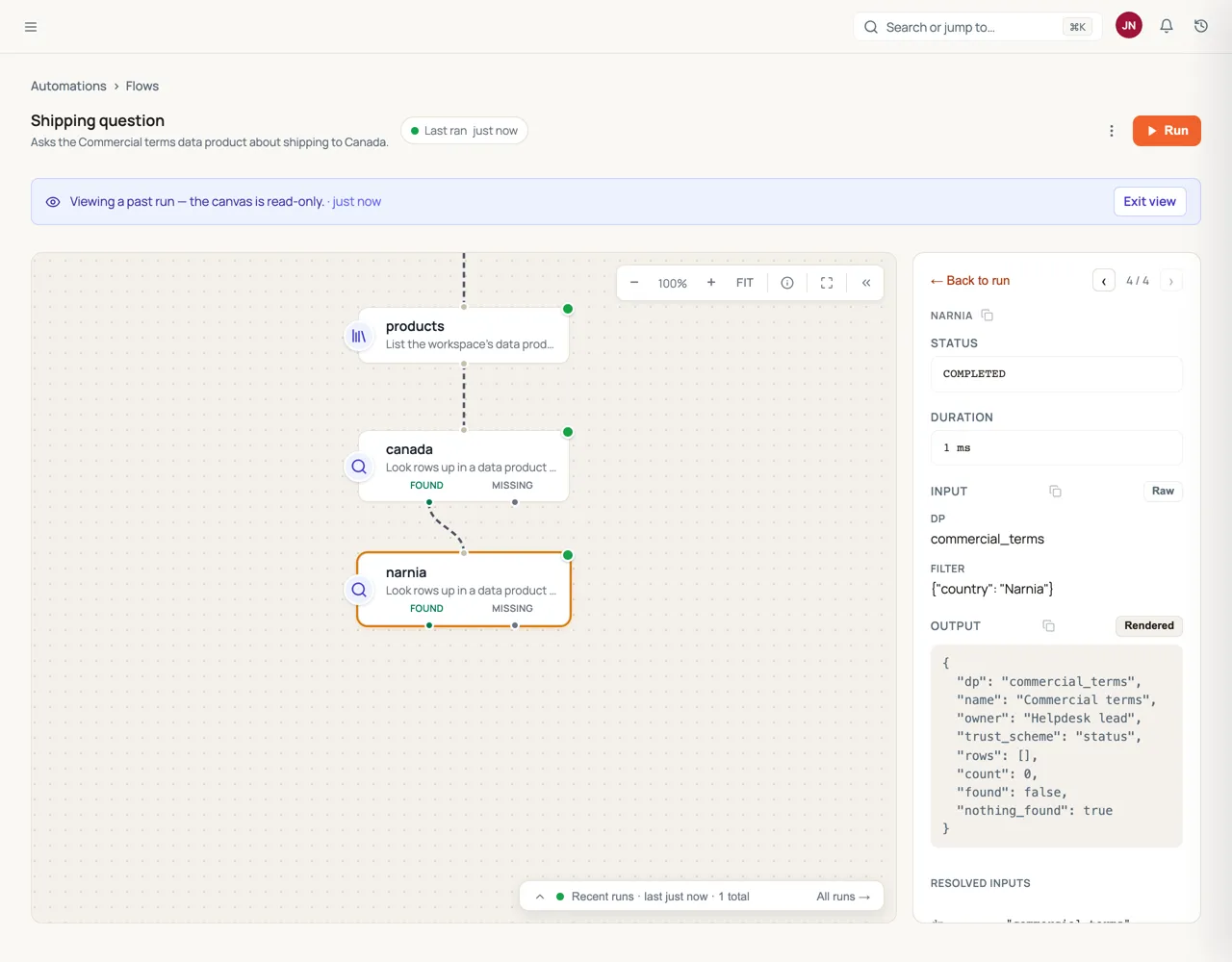
“Nothing found” is an answer too. When no row matches, the step says nothing_found: true rather than handing back an empty list the agent might fill from its own imagination. Asked for the weight of a part the customer never named, the catalogue says it found nothing, so the agent asks the customer which part it is. The step also has Found and Missing ports, so a flow can branch on it directly.
Asking in plain words
Section titled “Asking in plain words”An agent rarely knows which column holds the answer. Ask Data Product takes the product and the question — “Do we ship to Canada, and in which currency?” — and does the filtering itself:
- The question becomes a filter. A model reads the product’s manifest — what it answers, its example questions, what each column means and which options a column allows — and turns the question into a filter in the same grammar Look Up uses. It filters on what picks out the row (the country), not on what the question wants to read (the currency). The model is chosen under Settings → AI → Routing → Questions to a data product.
- The filter runs as a look-up. One row, or a handful, is the answer.
- A text match covers what the filter misses. If the filter finds nothing, its values are looked for in every text column — the model may have picked the right word in the wrong column. If they are nowhere, the answer is nothing found. If the filter finds more rows than the
limit, they are ranked by how well they match the question. And if no filter can be made at all, the question’s own words are matched against the text columns, rarest word first.
The answer is still rows, never prose — the same rows Look Up returns, each with its row_id, trust and owner — plus the filter the question was turned into and the strategy that found them, so you can check how the agent got its facts.
Worked example. A Shipping terms product has a row per country. Asked “Do we ship to Canada, and in which currency?”:
{ "dp": "shipping_terms", "question": "Do we ship to Canada, and in which currency?", "filter": {"country": "Canada"}, "strategy": "filter", "rows": [ {"row_id": "0199a3…", "trust": "high", "owner": "Logistics lead", "values": {"country": "Canada", "currency": "CAD", "price": 26, "carrier": "UPS", "notes": "Customs duty paid by recipient"}} ], "count": 1, "nothing_found": false}The agent writes the reply — “Yes, we ship to Canada with UPS; you pay 26 CAD, and customs duty is paid on delivery” — and every fact in it points at row 0199a3…. Asked “Do we ship to Narnia?”, the same call returns "filter": {"country": "Narnia"}, no rows and "nothing_found": true, so the agent says the product has no answer instead of inventing one.
Ask costs one small model call; Look Up costs none. When the agent already knows the column and the value — a SKU, a code — Look Up is the better call.
Every call is logged
Section titled “Every call is logged”Each time a flow, an agent or an MCP connection calls List Data Products, Ask Data Product or Look Up Data Product, Routario writes down what was asked and what came back: which product, the filter, and the row_id and trust of every row returned — or nothing_found. An ask also records the question and the strategy that found the rows. It never logs the rows’ values, and an e-mail address or phone number used as a filter value is masked as [email] / [phone].
The record lives in two places, and it is the same record in both.
On the run. Every look-up and ask step returns it as receipt, so opening the step on a past run shows the call and the row ids it relied on:
"receipt": { "kind": "lookup", "dp": "commercial_terms", "filter": {"currency": "EUR"}, "returned": [ {"row_id": "edca25a7…", "trust": "high"}, {"row_id": "ed9812bb…", "trust": "low"} ], "count": 2, "nothing_found": false}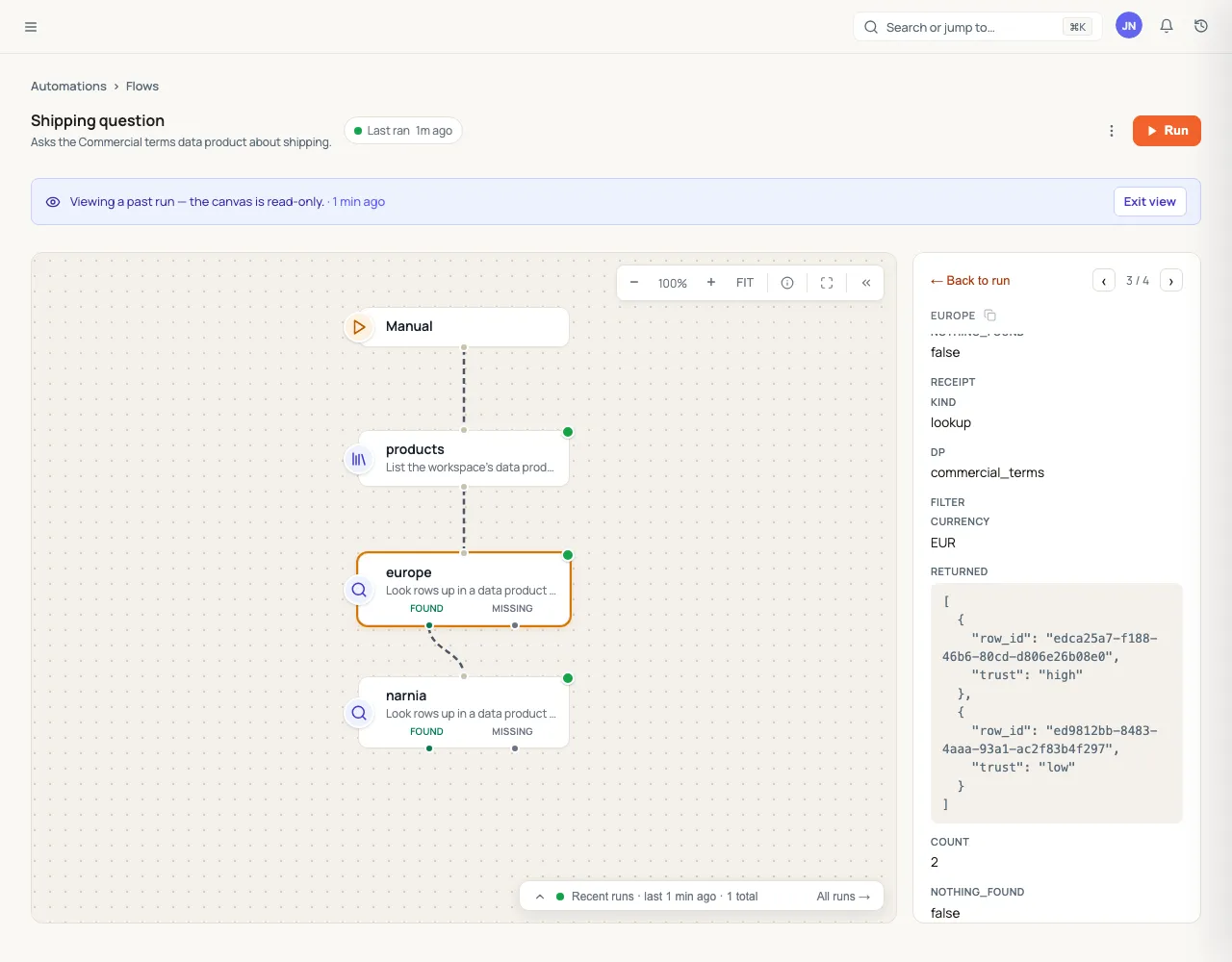
In the event log, across runs. The same record is a data_product.queried event, tied to the run (a flow run, or the agent run whose tool made the call). That is what answers the owner’s question: which questions found nothing, and how often? Build it as an ordinary chart:
- Data → Dashboards → New chart, and under The platform itself pick Events.
- Under Fields from the JSON, add
dp(path$.dp, Text) andnothing_found(path$.nothing_found, Yes / no). - Filter: Event is
data_product.queriedand nothing_found is yes. - X axis: When, by week. One series per product, each filtered to its
dp.
A product whose bar keeps growing is a product with a gap: the asks it could not answer are in the log, filter by filter, ready for the owner to add the missing rows.
In the table: trust you can see, and Confirm
Section titled “In the table: trust you can see, and Confirm”People see the same trust the agents do. Open a data product under Data → Tables and every row has a Trust column:
- A pill that reads High (green), Low (amber) or Expired (red). The word is always printed, so the colour never carries the meaning alone.
- Under it, the row’s freshness where the scheme has one: Confirmed 2026-10-01 by Helpdesk lead (a recent time stamp reads 3h ago), or Valid until 2026-12-31 / Expired after 2026-09-30. A row confirmed without a named person reads as confirmed by the owner role.
The Trust filter in the toolbar narrows the table to the rows you need to look at — every Low row waiting for the owner, or every Expired offer. It is offered where rows can differ: a status table filters High or Low, a validity table High, Low or Expired. An authoritative table is High throughout, so it has no Trust filter.
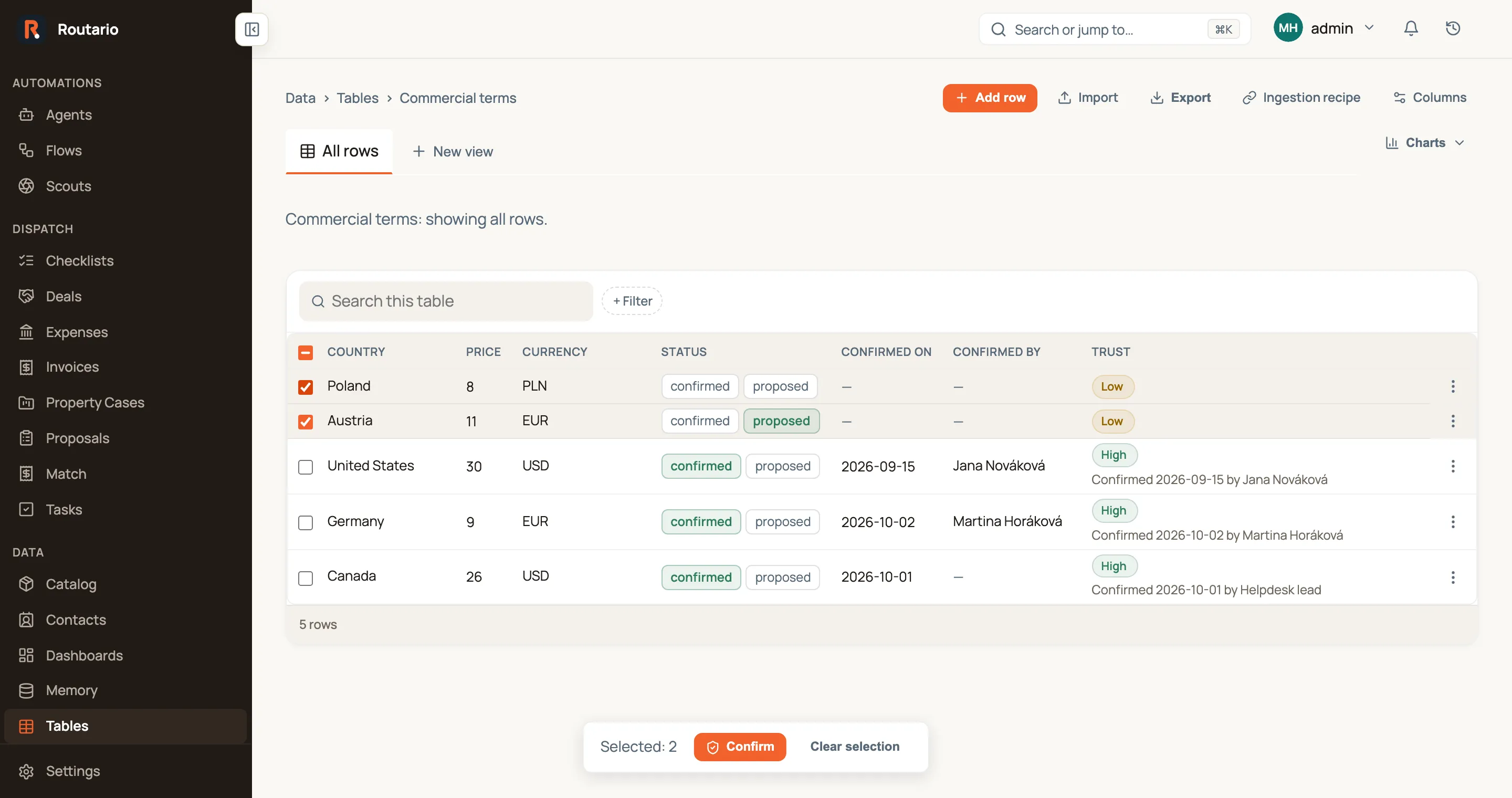
Confirm is how the owner says “this row is still right”. It sits in each row’s menu, and for several rows at once you tick them and use Confirm in the bar at the bottom (or select every row that matches the current filter). Confirm sets the row to the scheme’s trusted value — the first trusted status, e.g. confirmed — and stamps the confirmed on column with today and the confirmed by column with your name. On a validity or authoritative table there is no status to set, so Confirm only stamps the date and name, and it is offered only when the table has a confirmed on column.
Confirm is an ordinary, recorded edit of the row: it appears in the row’s history with who and when, like any other change, and it emits data_product.row.confirmed for flows that react to it. Anyone who can edit the table’s rows can confirm them; the stamp says who did.
Who can read a data product
Section titled “Who can read a data product”A data product is a table, so access to it is access to its table: read, or read and change, granted per table. Nobody new gets it by default.
- Agents see only the products — and the tables — they are granted. Grant them on the agent’s page under Tables it can use, or on the product’s page under Who can read or change it. Without a grant, an agent’s list skips the product and a lookup answers as if it did not exist; its record steps refuse the table and say which grant is missing.
- When you drive an agent, it is also bounded by what you may read, as it is for everything else.
- By tag. A grant on a tag reaches every product whose table carries the tag, as soon as it is tagged. See Granting by tag.
- People and API keys are granted the same way on the product’s page; an MCP connection or API key sees only what it was granted.
- All tables exists, on the agent’s page and in Settings → Access, but it is a deliberate choice with a warning: the agent then sees every table, including ones added later. Prefer the tables it needs.
Agents that already used record steps before per-table access arrived were given All tables, so nothing stopped working; narrow them on their page. Every grant change is recorded with who made it.
People find a product’s rows the same way from ⌘K: type israel and the row that answers it comes back, but only for someone who may read that table. See ⌘K: what it finds and who sees what.
Ask your data products from Claude or ChatGPT
Section titled “Ask your data products from Claude or ChatGPT”The same three calls — list, ask and look up — are tools on your workspace’s MCP endpoint, so a team can ask
its data products from Claude, ChatGPT or any other MCP client — and get the same
answer a flow gets: rows with their row_id, trust and owner, and
nothing_found when nothing matched. Each call is logged like any other, with
the connection as the actor.
- In your AI client, add Routario as a remote (custom) MCP connector:
https://mcp.routario.com/mcp. - Sign in and pick your workspace. On the consent screen, open the extra options and tick the products the agent should ask, under Data products.
- Ask in plain words: “What do we charge to ship to Canada, and is that confirmed?” The agent lists the products, looks the row up, and tells you the price, its trust and the row it came from.
A connection sees only the products whose tables it was granted, and you can only grant tables you can open yourself. Full steps, the developer-key route and the security model: Connect an AI agent over MCP.
Agents propose, owners confirm
Section titled “Agents propose, owners confirm”Agents learn things: a customer quotes a new shipping price, a supplier renames a part. Propose Data Product Row is the only way an agent adds such knowledge. It does not write the fact into a prompt, an instruction or a notebook. It proposes it to the data product that holds that kind of fact, and the owner decides.
An agent, or a flow step, proposes one of two things:
- A new row:
values, keyed by column, e.g.{"country": "Norway", "price": 390, "currency": "NOK"}. - A correction of a row it looked up: the
row_idplus thechanges, e.g.{"price": 420}.
Each proposal carries its source: the ticket, a short quote, a link. The run id is added automatically, so the owner can check where the fact came from.
A product takes proposals only when its write policy is agents propose, the owner confirms. A product set to only the owner refuses the call and names its owner.
What happens to a proposal:
- A new row goes into the table straight away, at low trust. On a status table its status reads
proposed, so an agent that asks the product sees the row as unconfirmed rather than not at all. An authoritative table, where every row is high, keeps the row on the proposal until it is accepted. - A correction changes nothing until it is accepted.
- The trust columns belong to the owner. A proposal cannot set the status or the confirmed on or confirmed by columns. A proposed valid until date waits on the proposal and is written only on accept.
- The same proposal is never stored twice. If it is still waiting, already accepted or was rejected, the agent is told so and nothing new is stored. Differences in spaces or capitals do not count. A rejected proposal stays rejected: the agent is told not to propose it again.
The owner decides from the Inbox. Each proposal is a decision with three buttons:
- Accept writes the row and confirms it, through the same path as Confirm in the table. The row becomes high trust, stamped with your name and today.
- Edit & accept opens the proposal with its values editable, so you can fix a figure before accepting. A correction shows each cell’s current value next to the proposed one.
- Reject keeps the proposal, marked rejected, so the same proposal is refused next time. A new row it had put in the table is archived, so agents no longer get it back. You can restore it from the table.
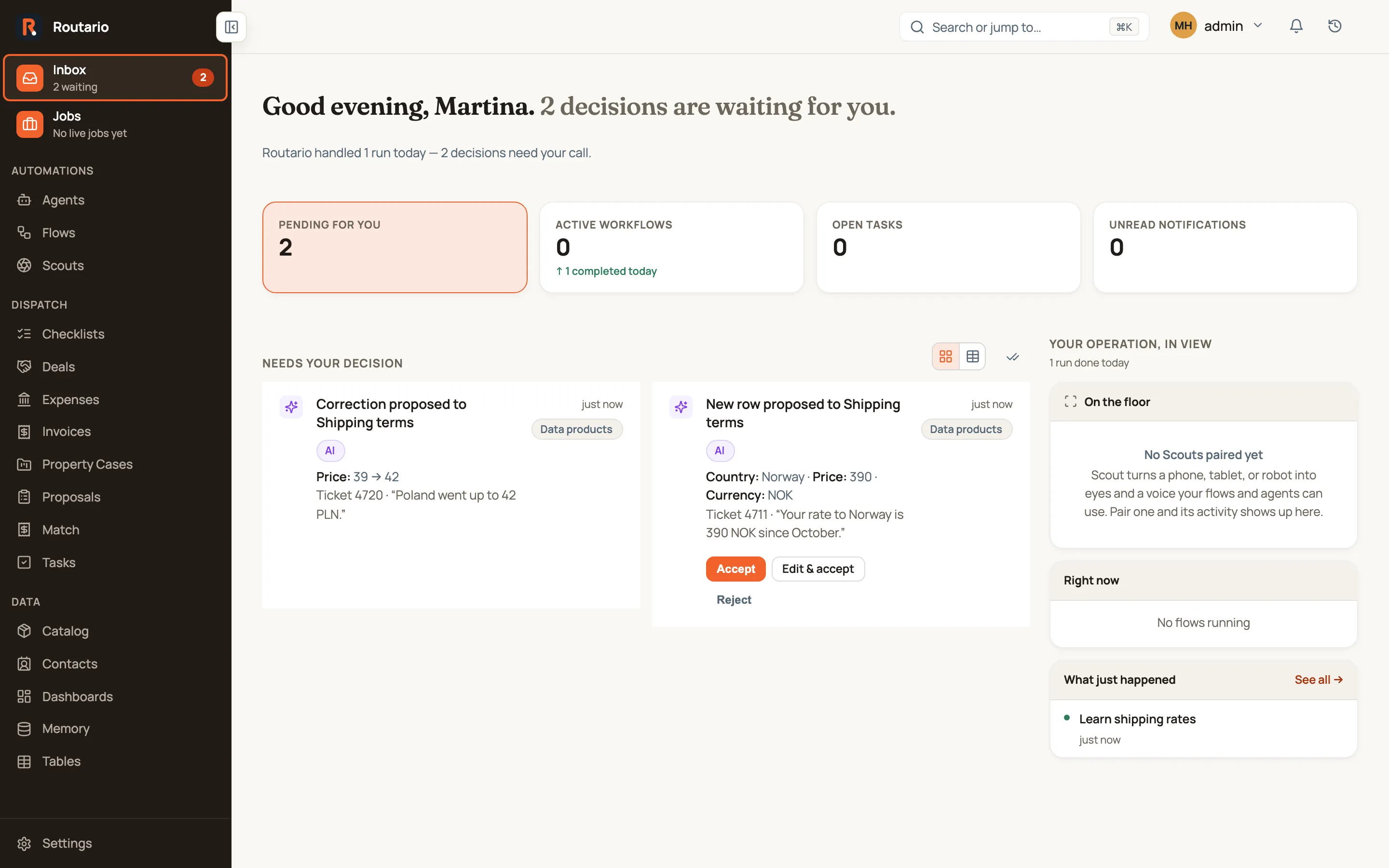
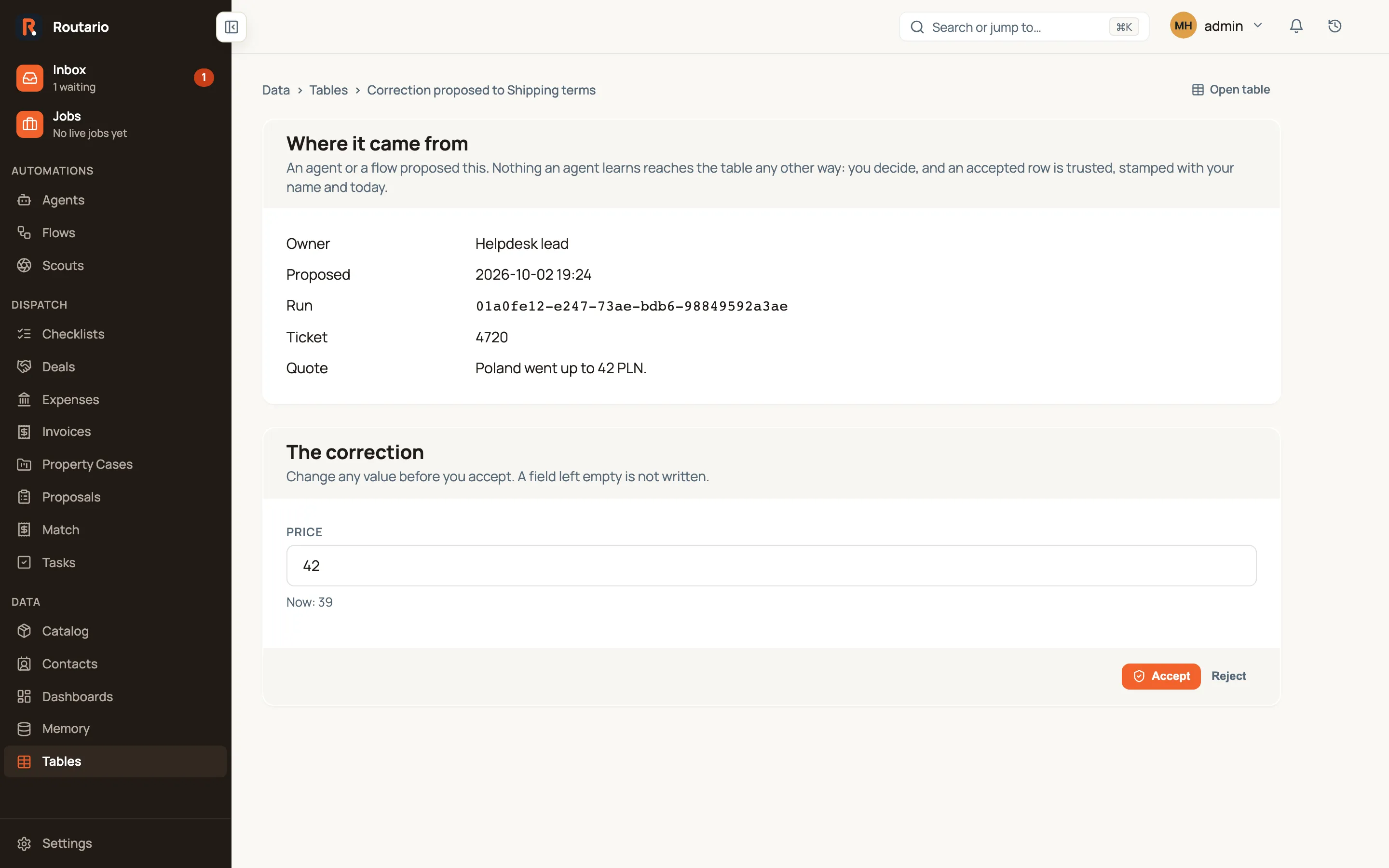
Each step is on the event log: data_product.row.proposed, then data_product.proposal.accepted (plus data_product.row.confirmed) or data_product.proposal.rejected. Every row write is in the row’s history, like any other edit.
Who sees proposals today. The owner in the manifest is a role, such as “Helpdesk lead”, and Routario does not yet link a role to people. Until it does, proposals go to the workspace’s administrators. If the workspace has no administrator, everyone who can sign in sees them.
Not every table needs one
Section titled “Not every table needs one”Ordinary tables stay ordinary, and List Records still reads them. Make a table a data product when an agent acts on what it says, so ownership, trust and receipts matter.